Transforming Points Using Camera Matrix
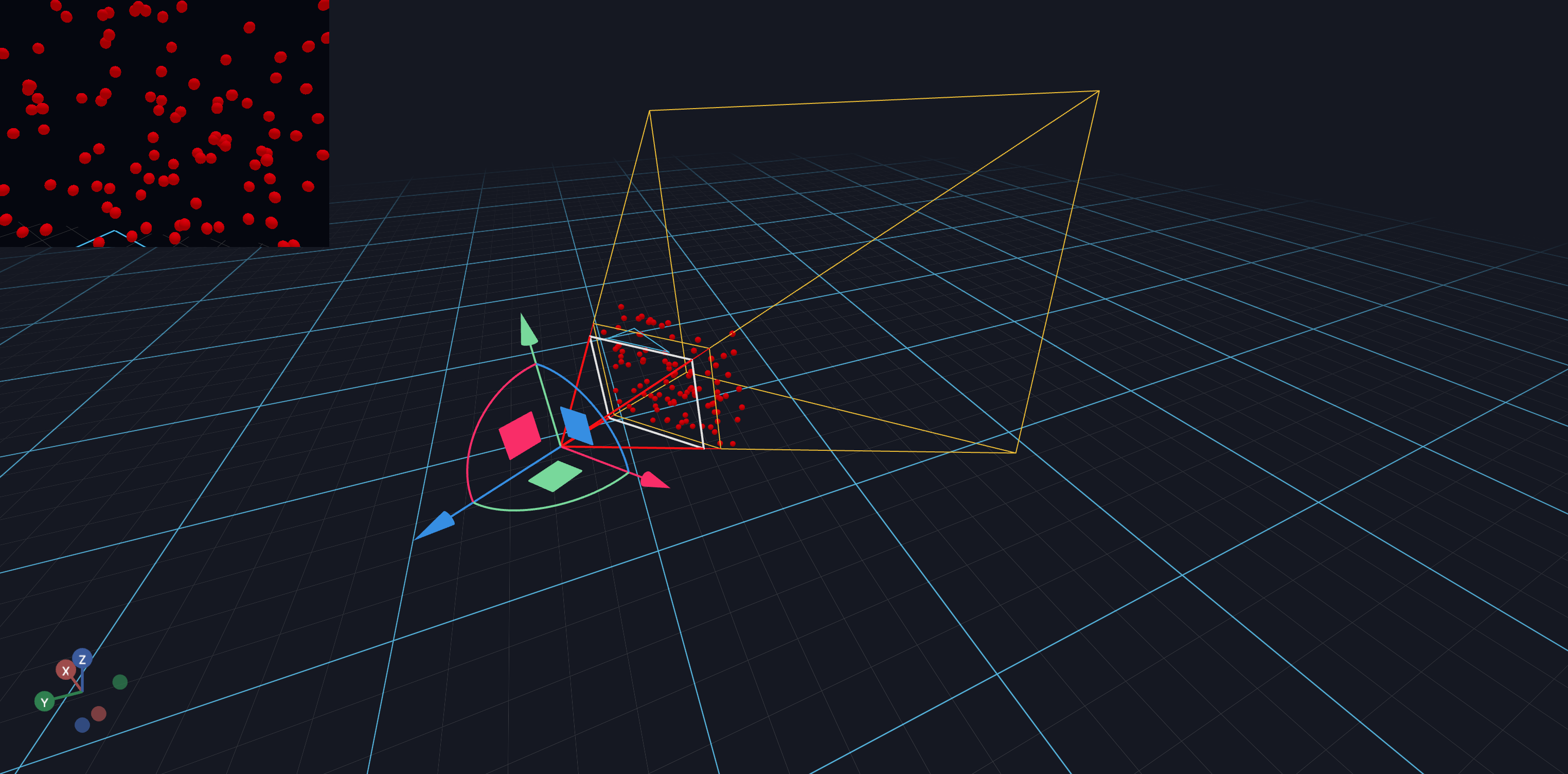
This tutorial shows how to transform points from camera space to world space using the camera's transformation matrix. This is useful when you need to:
- Place objects relative to the camera's view
- Visualize the camera frustum with sample points
- Project points between coordinate systems
This tutorial will teach you how to:
- Sample random points within a camera frustum
- Transform points using homogeneous coordinates
- Update scene objects in response to camera movement
Step 1: Define Frustum Sampling Function
First, we create a helper function to sample random points within the camera frustum. The frustum is the visible volume between the near and far clipping planes.
        near plane    far plane
           │             │
     ┌─────┼─────┐ ┌─────┼─────┐
     │  ·  │  ·  │ │  ·  │  ·  │
     │  ·  │  ·  │ │  ·  │  ·  │
     └─────┼─────┘ └─────┼─────┘
           │             │
        camera ─────────────────▶ Z (backward)
Points are sampled in view space where X is right, Y is up, and Z points backward.
from typing import Tuple
import numpy as np

def sample_camera_frustum_batch(
    fov: float,
    width: float,
    height: float,
    near: float,
    far: float,
    num_samples=1,
    **_,
) -> Tuple[np.ndarray]:
    """Sample Camera Frustum

    For rectangular cameras, sample a point between near and far plane, relative to camera transform

    Output in view space: X right, Y up, Z backward

    (Assumed to have the same intrinsics for each sample)


    :param fov: vertical field-of-view, in degrees
    :param width: px
    :param height: px
    :param near: in meters (world units)
    :param far: in meters (world units)
    """
    aspect = width / height
    fov_rad = fov * np.pi / 180
    foh_rad = np.arctan(np.tan(fov_rad / 2) * aspect) * 2

    d = np.random.uniform(near, far, size=num_samples)  # distance in camera coordinates

    y_range = d * np.tan(fov_rad / 2)
    y = np.random.uniform(-y_range, y_range, size=num_samples)

    x_range = d * np.tan(foh_rad / 2)
    x = np.random.uniform(-x_range, x_range, size=num_samples)

    return np.stack([x, y, -d]).T
Step 2: Define Point Transformation Function
To transform points from camera space to world space, we use the camera's 4x4 transformation matrix. We convert 3D points to homogeneous coordinates (adding a fourth component of 1), multiply by the matrix, and extract the 3D result.
def transform_points(pts, matrix):
    """Transform 3D points using a 4x4 transformation matrix.

    Args:
        pts: Array of shape (N, 3) containing 3D points
        matrix: 4x4 transformation matrix

    Returns:
        Transformed points as array of shape (N, 3)
    """
    # Add homogeneous coordinate (w=1) to each point
    pts_homogeneous = np.hstack((pts, np.ones((len(pts), 1))))

    # Apply the transformation matrix
    transformed_pts = pts_homogeneous @ matrix

    # Extract 3D coordinates (drop the w component)
    return transformed_pts[:, :3]
Step 3: Set Up the Scene and Camera Movement Handler
We create a scene with a movable CameraView and register a handler to track
when the camera is moved. When the camera matrix changes, we'll update the
positions of the sample points.
import asyncio

from vuer import Vuer, VuerSession
from vuer.events import ClientEvent
from vuer.schemas import DefaultScene, CameraView, Sphere, OrbitControls

# Sample 100 random points within the camera frustum
ball_pts = sample_camera_frustum_batch(
    fov=50,
    width=320,
    height=240,
    near=0.45,
    far=0.5,
    num_samples=100,
)

app = Vuer()

# Initial camera transformation matrix (4x4, column-major format)
# fmt: off
matrix = np.array([
    -0.9403771820302098, -0.33677144289058686, 0.04770482963301034, 0,
    0.14212405695663877, -0.26162828559882034, 0.9546472608292598, 0,
    -0.30901700268934784, 0.9045085048953463, 0.2938925936815643, 0,
    -0.47444114213044175, 1.2453493553603068, 0.5411873913841395, 1,
]).reshape(4, 4)
# fmt: on

@app.add_handler("CAMERA_MOVE")
async def track_camera_movement(event: ClientEvent, sess: VuerSession):
    """Update the global matrix when the camera is moved."""
    global matrix

    # Only respond to the "ego" camera
    if event.key != "ego":
        return
    if event.value["matrix"] is None:
        return

    new_matrix = np.array(event.value["matrix"]).reshape(4, 4)
    if not np.allclose(new_matrix, matrix):
        print("Camera matrix changed")
        matrix = new_matrix

@app.spawn(start=True)
async def main(proxy):
    # Set up the scene with a movable camera
    proxy.set @ DefaultScene(
        rawChildren=[
            CameraView(
                fov=50,
                width=320,
                height=240,
                key="ego",
                matrix=matrix.flatten().tolist(),
                stream="ondemand",
                fps=30,
                near=0.4,
                far=1.8,
                showFrustum=True,
                downsample=1,
                distanceToCamera=2,
            ),
        ],
        grid=False,
        bgChildren=[
            OrbitControls(key="OrbitControls")
        ],
    )

    last_matrix_id = None
    while True:
        # Only update when the matrix changes
        if last_matrix_id and id(matrix) == last_matrix_id:
            await asyncio.sleep(0.016)
            continue

        last_matrix_id = id(matrix)

        # Transform sample points from camera space to world space
        world_pts = transform_points(ball_pts, matrix)
        print("Updating ball positions")

        # Create spheres at the transformed positions
        proxy.upsert @ [
            Sphere(
                args=[0.01],
                position=world_pts[i].tolist(),
                material=dict(color="red"),
                materialType="phong",
                key=f"ball-{i}",
            )
            for i in range(len(ball_pts))
        ]

        await asyncio.sleep(0.01)